

Build, scale, and govern AI‑driven automation with more control 🚀
Leapwork 2026.1 brings a new set of AI and governance capabilities that help teams:
- Build flows faster with guided AI assistance.
- Run large portfolios more efficiently across web, desktop, mobile, and enterprise apps.
- Keep data growth under control and stay compliant in regulated environments.
Before upgrading, we recommend reviewing:
- Upgrade Matrix: Upgrade Matrix | Leapwork Docs
- Salesforce Login block docs (MFA/Fusion): Salesforce Login | Leapwork Docs
To ensure compatibility between this Leapwork Release and your system requirements, including OS and browser drivers, please refer to our System requirements | Leapwork Docs article.
Why upgrade?
In 2026.1, you get:
- Better diagnostics with new modules for capturing logs and handling No browser window scenarios, helping resolve issues faster.
- AI-powered building with the new AI Action block (Tech Preview) and AI Flow builder (Tech Preview), reducing manual effort in flow design.
- Upgraded OpenAI model (GPT‑5.2) powering AI features, which may change how existing AI prompts behave, so we recommend reviewing and fine‑tuning your prompts for optimal results.
- Continued Elegance improvements across search, run lists, and Studio UX for better usability and navigation.
- Storage-as-a-Service for easier asset management.
- Stronger governance and compliance tooling, including retention policies and enforced signatures.
- Stable Chrome 147 support, helping teams run automations on the latest supported Chrome version with fewer browser compatibility issues.
- Expanded enterprise and platform support, including Salesforce MFA improvements, WMA v4 on iOS, and D365 F&O enhancements.
When you are ready to dive deeper, the sections below walk you through each new capability in more detail.
✨ New Leapwork branding
With the 2026.1 release, Leapwork introduces a refreshed brand experience across the product and documentation.
The new branding will continue to evolve in upcoming 2026.X releases, with additional refinements planned across in‑product help, reporting views, and documentation assets.
🚨 New features
AI Action block (Tech Preview)
Use AI directly inside your flows to speed up repetitive or fuzzy tasks.
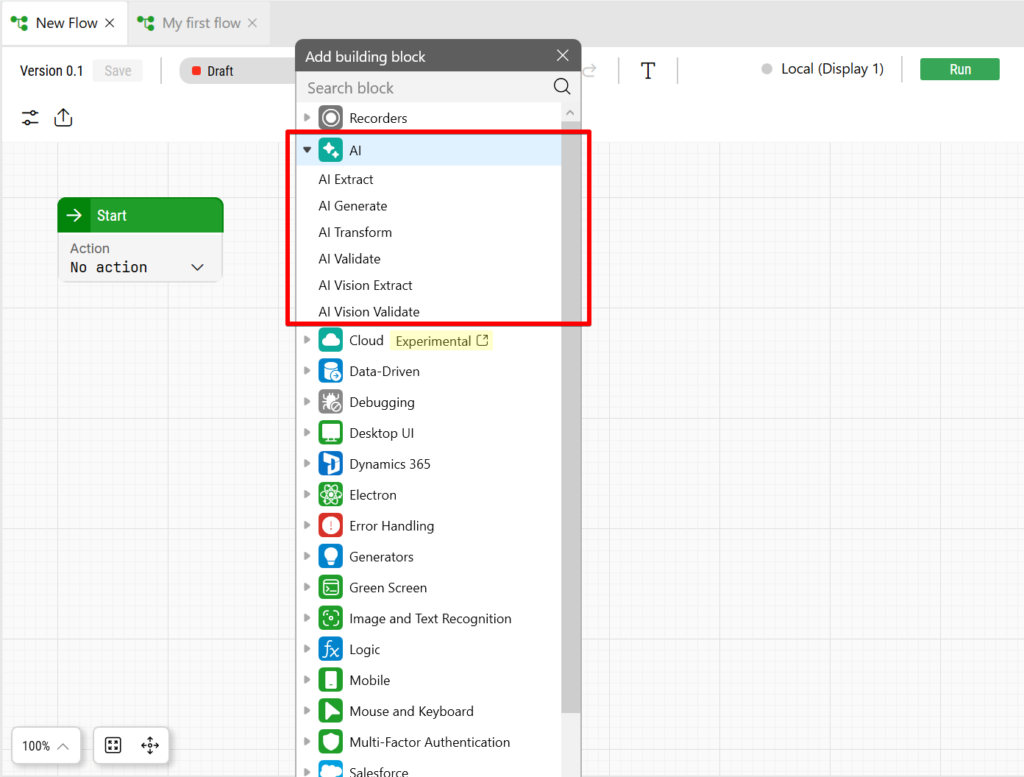
What it means in practice:
- Offload small analysis or transformation steps to an AI block instead of crafting complex logic.
- Keep everything low‑code and transparent; AI becomes just another building block in your canvas.
- Reduce the time spent on maintaining brittle rules as business inputs change.
AI Flow builder (Tech Preview)
Design and refactor automation flows faster with AI‑assisted building.
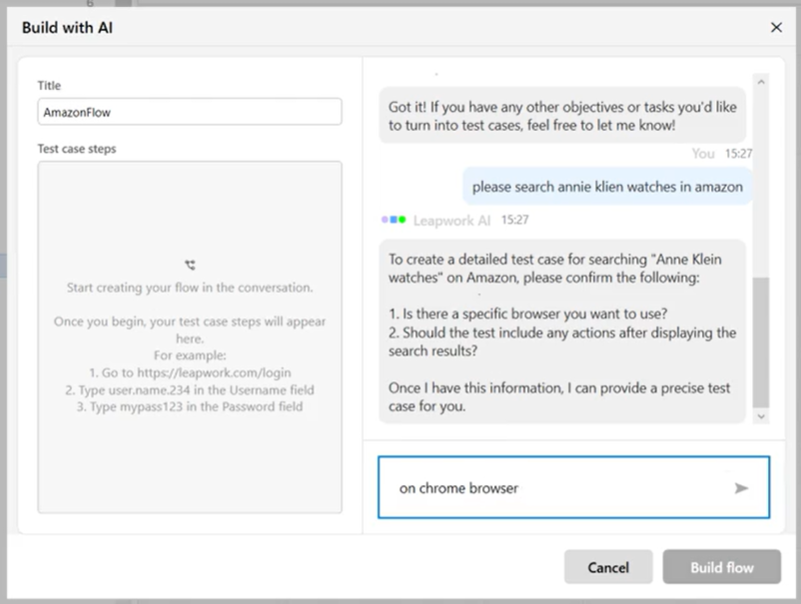
Key benefits:
- Turn natural language descriptions of a scenario into a first draft of a flow you can review and adapt.
- Let AI suggest improvements or clean‑ups to existing flows, so large suites are easier to maintain over time.
- Help new team members get productive faster with guided flow generation rather than starting from a blank canvas.
🛠️ Feature Enhancements
Elegance – Flow search
Quickly find the flow you need in large workspaces.
What improves:
- Search results are more accurate and easier to scan so you can jump directly to the right flow.
- Designers and QA engineers spend less time hunting for the right artifacts and more time improving coverage.
- Large organizations benefit from a more “discoverable” automation portfolio.
Elegance – Run Lists & Schedules
Run management gets a cleaner, more informative experience.
What you gain:
- Clearer visual states for frozen/active run lists and who last changed them.
- Easier scheduling and re‑runs, so teams can reliably orchestrate regression suites at scale.
- Less friction when moving from design to execution, especially for cross‑team suites.
Elegance – UI/UX tweaks across Studio
Dozens of small refinements add up to a smoother day‑to‑day workflow:
- More consistent layouts and visuals in Studio.
- Reduced visual noise so complex flows are easier to read at a glance.
- A more coherent Elegance experience that aligns with the design changes introduced in earlier 2025.x releases.
Studio productivity and in‑flow editing
Bulk actions in Studio
Manage large portfolios without repetitive clicks.
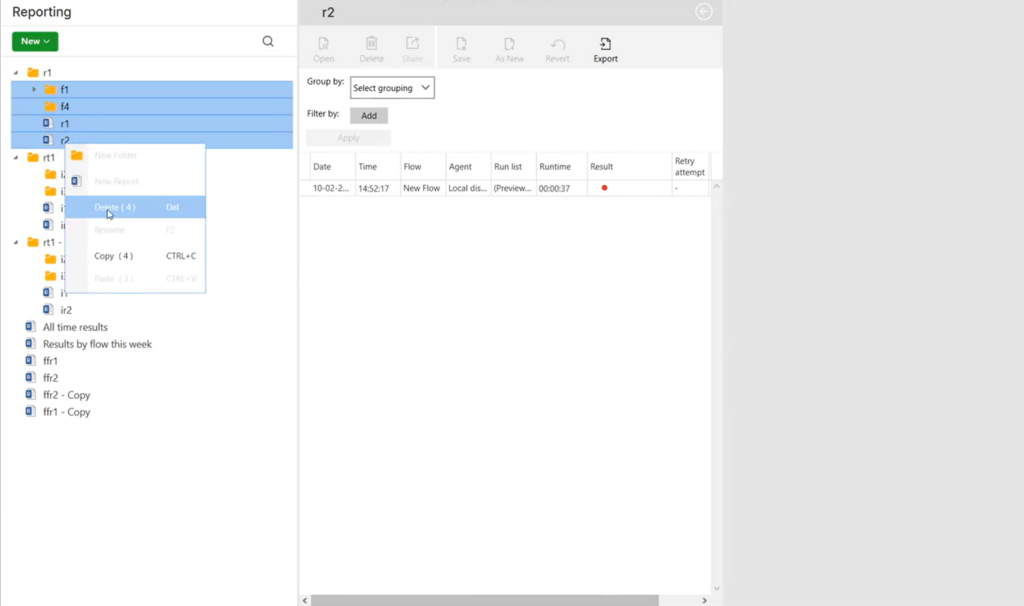
What you can do:
- Use bulk actions (not only Delete, but also Copy and Move) on multiple items at once.
- Restructure workspaces, reorganize flows, or clean up old artifacts far more quickly.
- Free up time for building value instead of manual housekeeping.
Search within a flow
Find what you need inside big flows in seconds.
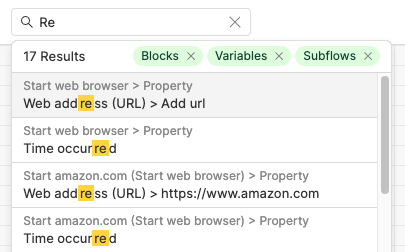
Benefits:
- Search by block name, labels, or other identifiers within a single flow.
- Jump directly to the right step when troubleshooting or refactoring.
- Make it easier for multiple contributors to understand and maintain complex automations.
Recapture and inline editing of elements in Fusion recorder
Iterate on recordings without starting from scratch. To use Recapture and inline editing, you first need to enable experimental features in the browser. For step‑by‑step instructions, see:
Fix and Update Elements Directly in Fusion Recorder | Leapwork Docs
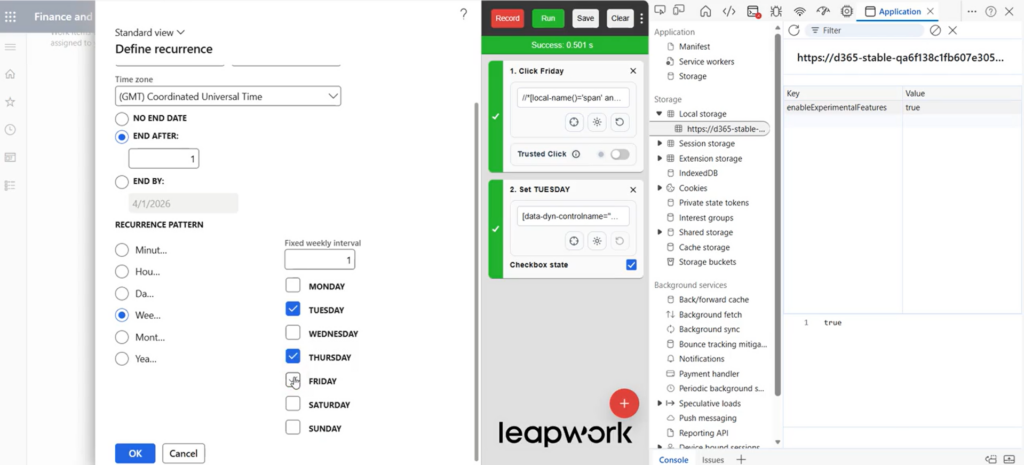
What improves:
- Recapture elements directly from the Fusion recorder when a UI changes, instead of rebuilding blocks.
- Edit element details inline in the recorder and push changes back to Studio.
- Keep flows resilient as applications evolve, while reducing the cost of maintenance.
OCR 3.0 and Neural Processor Engine
Introduce a new generation of OCR capabilities with improved accuracy and enterprise-scale validation.
What this delivers:
- Neural Processor engine for complex UI: High-accuracy OCR for dark themes, dense data tables, gradients, and small or dynamic text where traditional OCR struggles.
- Enterprise-scale validation: Successfully validated across 40,000+ test cases in real-world workflows within a controlled enterprise environment.
- OCR engine choice per use case: Use OCR 3.0 for clean, simple screens, and switch to Neural Processor for maximum robustness in visually complex applications.
- More reliable image-based automation: Reduces flakiness caused by layout or rendering variations in UI-driven tests.
To choose the right engine and preset for your scenario, see the OCR Engine Selection Guide | Leapwork Docs
🤖 Integrations
Azure DevOps (ADO) synchronization
Keep Azure DevOps and Leapwork in sync more reliably.
What this unlocks:
- Better alignment between test runs in Leapwork and test cases or work items in ADO.
- Less manual housekeeping to keep artifacts in sync across tools.
- Clearer traceability between business requirements, test automation, and execution results.
PowerShell script for Xray (Jira) integration
Simplify how Leapwork runs are reflected in Xray.
Key benefits:
- Update Xray Test Executions from Leapwork schedules without generating redundant Jira issues.
- Maintain cleaner Jira/Xray projects with a single source of truth for each run.
- Reduce noise for QA leads and auditors who depend on Xray reports.
🧩 Enterprise app & platform coverage
MFA for Salesforce Fusion
Handle modern Salesforce MFA flows more flexibly with the Salesforce Login block.
From the docs: Salesforce Login | Leapwork Docs
What’s improved:
- Choose between Automated and Manual Login methods depending on your MFA setup.
- Use the OTP result code attribute to plug in values from TOTP blocks and supported authenticator apps.
- Capture and validate every step of the login flow so your automation remains stable even as security policies evolve.
Integrated Stable Chrome version 147
Run automations using a managed Chrome version for improved stability and consistency.
Benefits:
- Includes integrated Stable Chrome version (147) within Leapwork.
- Reduces browser and driver compatibility issues.
- Improves the reliability of web automation runs.
- Supports more predictable execution across environments.
How to use:
- Select the specific Chrome version in the Start Web Browser block.
- Optionally enable it as a default in Settings → Default Settings to apply across all flows.
Nested filters and dropdowns in D365 F&O
Work with complex Finance & Operations forms more reliably.
What you gain:
- Support for nested filters, dropdowns and multi‑level selections in D365 F&O.
- Less need for brittle workarounds when automating advanced finance, operations, and logistics scenarios.
- Stronger end‑to‑end coverage across D365 workflows.
WMA v4 on iOS
Bring Warehouse Management App 4 automation to iOS.
Why this matters:
- Extend existing WMA v4 automation (previously on desktop and Android) to iOS.
- Standardize test coverage across handheld devices in warehouses and in the field.
- Reduce gaps between platforms so changes can be validated consistently everywhere users work.
SSO users not visible in the Users tab
In some environments, SSO users may not appear in the Users tab in the Platform / Enterprise UI. This can happen when database maintenance issues (such as index fragmentation) cause the query used to retrieve existing AD users to time out.
SSO authentication itself continues to work as expected. However, because the lookup query can time out, some existing users may not be displayed in the UI even though they can still sign in successfully.
Recommendation
If SSO users are missing from the Users tab, we recommend that administrators:
- Rebuild database indexes as part of regular, proactive database maintenance.
- Run the provided database script to restore the correct visibility of users in the UI.
For detailed steps and scripts, see the attached file: Steps_DBScripts.txt
Selenium Manager runs as default
Make web automation setup more “hands‑off” out of the box.
Benefits:
- Selenium Manager is now the default for new Studio installs, so browser drivers are handled automatically.
- Fewer configuration steps and less risk of version mismatches between browsers and drivers.
- Teams can get started faster with fewer environment issues.
📦 Data, storage and governance
Storage‑as‑a‑Service
Move automation assets closer to the cloud and simplify access. This feature is currently available for cloud agents only and is not supported for local agents.
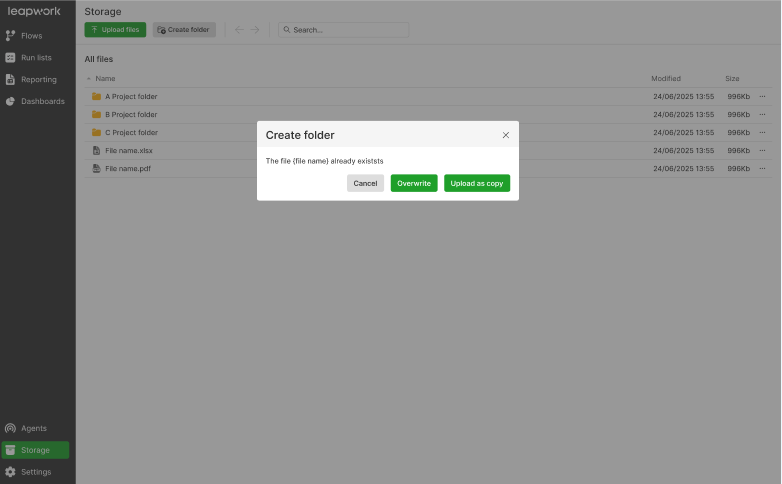
What this enables:
- Centralize scripts, data files, and connections using a service‑based storage approach.
- Support cloud‑first automation strategies without relying on fragile file shares.
- Make it easier to scale distributed test runs while keeping access to all required assets.
Retention policy for Audit Logs and Flow Version History
Keep performance high while staying compliant.
Key outcomes:
- Define retention windows for audit logs and flow version history so data doesn’t grow unchecked.
- Improve database performance and storage usage by automatically trimming stale records.
- Maintain only the information you actually need for audits, troubleshooting, and governance.
Signatures required before publishing flows
Enforce sign‑off for specific validated flows.
Why it’s important:
- Require users to sign flows before they can be published, in line with regulated-environment requirements.
- Support validation and electronic sign‑off processes common in regulated industries.
- Reduce risk by ensuring only reviewed and approved flows go into production use.
🐞 Bugs & Improvements
- AI Action block: Improved reliability of element targeting, scrolling, and popup handling. Enhanced sensitive input handling and cache behaviour; fixed incorrect actions, skipped executions, popup failures, and improved third-party agent performance.
- AI Flow Builder: Improved stability of AI-generated flows and chat. Fixed stuck loading, overlapping blocks/wires, improved multi-user handling, and enhanced conversational UI with better input and clarifications.
- Studio (Elegance): Enhanced flow search with in-flow navigation and improved run lists with sorting, multi-select drag and drop, and undo support. General UI/UX, modal, and validation improvements for better consistency.
- Azure DevOps (ADO): Simplified Area Path selection, improved import logs, and fixed incorrect execution duration reporting for long-running runs.
- Salesforce Fusion: Added MFA login support in Fusion Recorder and improved stability in dropdown handling and recording.
- Storage: Introduced cloud storage page with upload/download, folders, search, and team access. Fixed directory deletion issues and improved error handling for deleted files.
- Governance: Added configurable retention policies for audit logs and flow version history to manage outdated data.
- Studio Productivity: Expanded bulk actions to include copy and move. Improved handling of child reports and dashboards during folder copy.
- Mobile (iOS): Improved WMA v4 stability and compatibility; fixed issues with mobile recorder and BrowserStack configurations.
- Web Automation: Selenium Manager now runs by default; improved browser profile handling and UI rendering in scheduled runs.
- Integrations (Xray): Added PowerShell support to update Xray Test Executions per schedule without duplicate issues.
- D365 F&O: Improved capture and replay for nested dropdowns and grids; enhanced click, validate, and custom login handling.
- Fusion Recorder: Added in-flow search, inline editing, and element recapture; improved notes, tooltips, and UI feedback during recording.
🚀 Leapwork Performance General Availability
Leapwork Performance, our separate platform for API, load, and performance testing, is now available at Leapwork Performance.
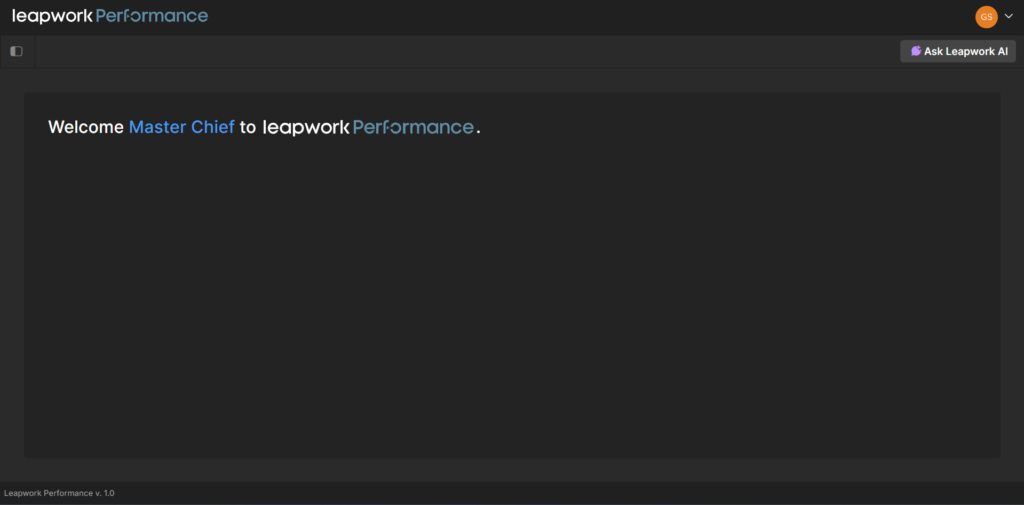
It brings Leapwork’s no‑code approach to performance and API testing, with:
- Visual, no‑code test design for performance and API scenarios.
- Scalable, realistic load to validate system behaviour under stress.
- Actionable insights and enterprise‑ready governance for performance results.
📚 Content & documentation experience
New documentation platform
A refreshed documentation experience to help teams find answers faster. You can access the new documentation platform at Leapwork Docs
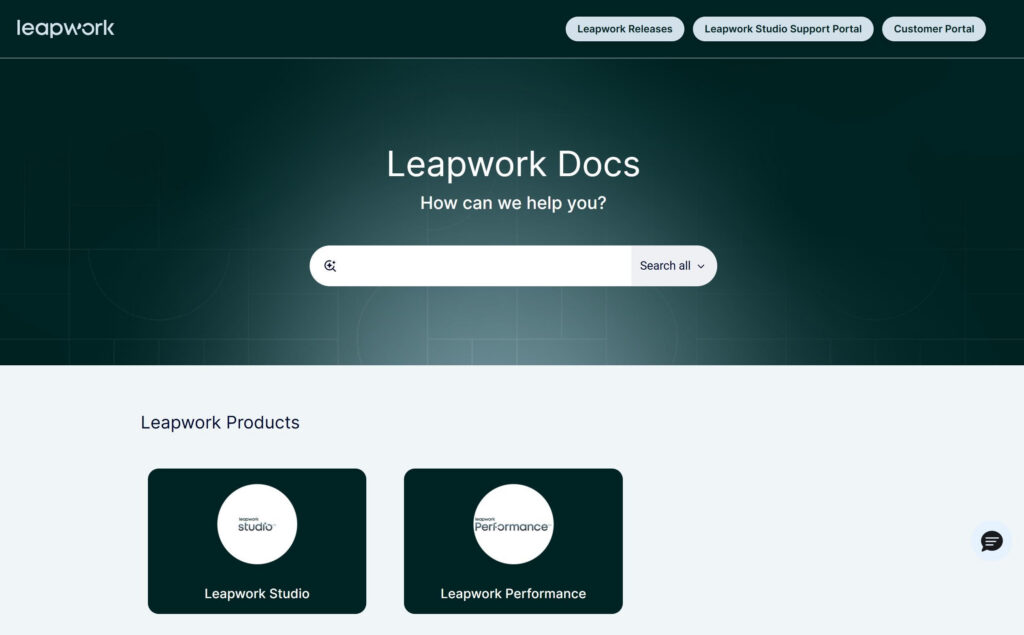
What this stage delivers:
- A new platform foundation for product documentation, how‑tos, and best practices.
- Clearer structure and navigation so users can get from question to answer more quickly.
- A scalable base for future improvements in guides, examples, and in‑product help.
What’s next?
These updates are designed to help you:
- Build more powerful flows faster with AI and Elegance improvements.
- Run automation at scale with better storage, retention, and enterprise app coverage.
- Stay in control in regulated and complex environments with stronger governance and integrations.
If you have any questions about upgrading to Leapwork 2026.1, contact your Customer Success Manager or speak to one of our Automation Specialists via the website chat.
Happy automating! 🤖✨