

Choosing a Playwright language can seem like a straightforward engineering preference: use the language your team already knows, install the binding, and start automating. At the browser level, that assumption largely holds. Playwright provides the same fundamental automation capabilities across TypeScript, Python, Java, and .NET, so the core mechanics remain familiar.
The more meaningful differences emerge as the test suite grows. Each language fits into a different testing ecosystem, with its own runner, reporting conventions, debugging workflow, and team expectations. That surrounding setup can shape the day-to-day experience just as much as Playwright itself.
With that in mind, the question remains: Which Playwright language should your team choose? This decision is a layered one, and we discuss the considerations below.
At a glance
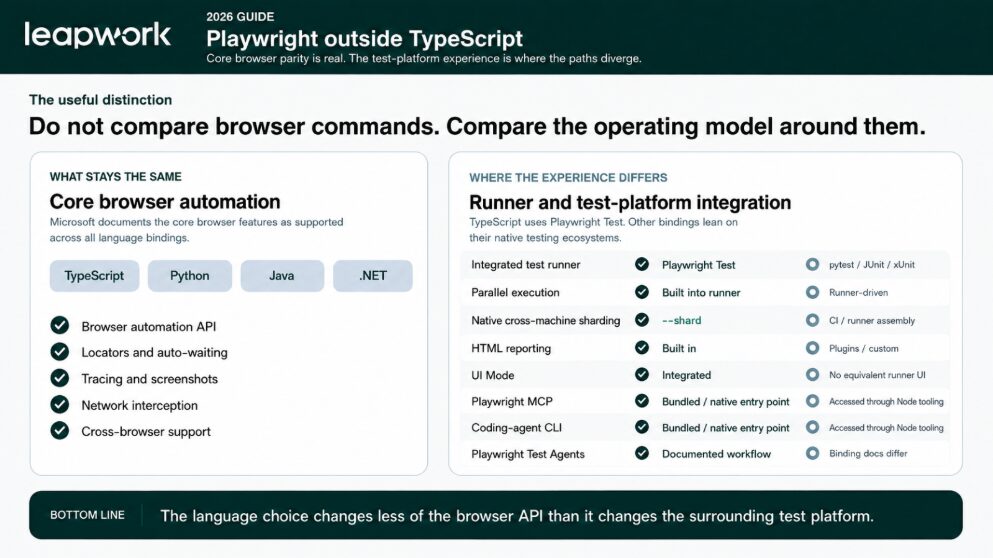
Microsoft supports the same core browser automation features across TypeScript, Python, Java and .NET. A locator behaves the same way, tracing still works, and the browser engine is shared. But once a suite grows beyond a few tests, the surrounding experience starts to diverge. TypeScript uses Playwright Test, which brings the runner and sharding into the same workflow. Reporting and tracing are also more tightly integrated there.
Java, Python and .NET take a different route. Java normally sits with JUnit or TestNG. Python commonly uses pytest, while .NET teams stay with MSTest, NUnit or xUnit. For an enterprise team, that changes how much of the setup comes from Playwright and how much the team brings from its existing test stack.
The practical differences are easiest to see side by side: the browser automation layer stays consistent, while the test infrastructure around it depends heavily on the language and ecosystem your team chooses.
| CORE BROWSER SUPPORT IS CONSISTENT Microsoft documents the core browser features as available across all four bindings. | TYPESCRIPT HAS PLAYWRIGHT TEST TypeScript gets Playwright Test as the integrated runner, with more runner-level tooling in the same ecosystem. |
| OTHER BINDINGS USE THEIR OWN TEST STACK Java, Python and .NET pair Playwright with runners their teams may already know and trust. | AI MAKES LANGUAGE LESS OF A BARRIER Agents can work across all four languages. The execution environment still shapes the day-to-day experience. |
See the difference in 40 seconds
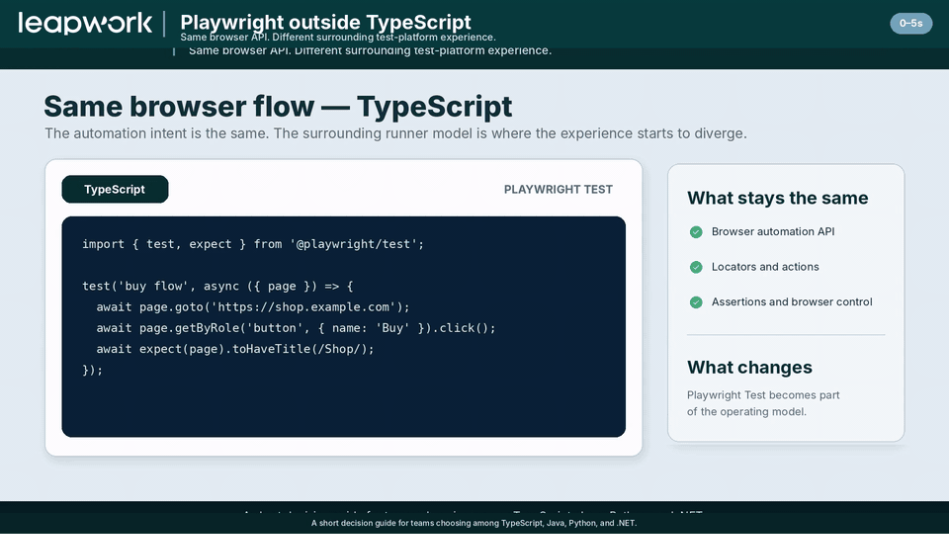
If you prefer to see the difference rather than read about it, the short walkthrough below uses the same browser flow in TypeScript and Java.
From there, it moves into Playwright Test UI Mode and cross-machine sharding. The reporting experience comes next. The last part adds MCP, the coding-agent CLI and an AI agent to show what changes when the agent can work across all four languages.
By the final scene, the language itself carries less weight because the agent can work across bindings. The runner and the surrounding setup still determine what the team has to operate.
Does Playwright really support Java, Python and .NET?
Playwright does indeed support Java, Python and .NET. Microsoft documents the core browser automation features as supported across its language bindings. A production suite written in Java, Python or .NET uses the same browser engine and core automation model.
The day-to-day setup is different. TypeScript runs naturally with Playwright Test. Python commonly uses pytest. Java teams usually bring JUnit or TestNG, while .NET teams work with MSTest, NUnit or xUnit. That choice affects how tests are executed and how the surrounding tooling is put together.
What changes outside TypeScript?
When a team chooses Java, Python or .NET, more of the test platform comes from the language ecosystem. Playwright still provides the browser automation, while the native runner usually takes care of execution and much of the surrounding workflow.
| Capability | TypeScript / Node | Java / Python / .NET |
| Browser automation API | Full Playwright capability | Full Playwright capability |
| Test runner | Playwright Test | pytest / JUnit-TestNG / .NET runners |
| Runner-level tooling | UI Mode, reports and sharding in Playwright Test | Handled through the runner and CI ecosystem |
| Playwright MCP | Node entry point in the Playwright package | Node MCP works alongside the binding |
| Coding-agent CLI | Node entry point in the Playwright package | Node CLI works alongside the binding |
| Test Agents | Built around Playwright Test | No matching native binding workflow |
For some teams, that is a good trade. Existing Java, Python or .NET standards can be more useful than adopting a new runner simply because it sits closer to Playwright.
Where do the differences show up on a day-to-day basis?
1. The test runner
TypeScript teams normally use Playwright Test, so the runner and assertions come from the same project. Isolation and parallel execution are part of that runner as well. In Java, Python and .NET, those responsibilities sit with the native runner, which may already be deeply embedded in the team’s build and CI conventions.
2. UI Mode and debugging
UI Mode is one of the easiest differences to notice. A TypeScript team can run tests, inspect traces and debug failures from the Playwright Test UI. Other bindings still have Playwright Inspector and Trace Viewer, while their runner experience lives elsewhere.
3. Parallelism and sharding
Parallel execution is available in every binding. With Playwright Test, cross-machine sharding is a first-class runner feature through shard. Python usually handles distribution through pytest and CI. Java and .NET teams configure it through their chosen runners and build pipelines.
4. Reporting and visual regression
Screenshots and traces are available everywhere. Playwright Test adds its own screenshot assertion workflow and HTML report. Teams on the other bindings usually connect those outcomes to runner plugins or their existing reporting setup.
5. Does AI make the language choice less important?
AI has changed the weight of the language choice decision. An agent can write and refactor a Playwright test in TypeScript, Java, Python or C# with very little friction, so language familiarity matters less than it did when people wrote every line by hand.
The generated code still has to execute in a real project. A Java test ends up in JUnit or TestNG. A Python test runs through pytest, and a C# test follows the selected .NET runner. Each environment brings its own dependencies and CI conventions, along with the reporting choices the team already uses.
MCP and the coding-agent CLI make the picture more interesting. Java, Python and .NET can use the Node-based agent tooling, and browser.bind() lets those tools attach to browser sessions created by the other bindings. Playwright Test Agents remain built around Playwright Test. A greenfield team may value that tighter connection and choose TypeScript. An established Java or .NET team may prefer to keep its current language and use MCP or the CLI alongside it.
The biggest point to keep in mind here is that, with AI handling more of the code generation itself, the language carries less weight than the runner and surrounding tooling used to operate the suite.
If you’re migrating from Selenium, should you change language too?
You should probably not change language as a default if you’re migrating from Selenium. A Selenium Java or C# estate already has build conventions, helper libraries and CI jobs that people know how to support. Moving to Playwright changes the automation framework on its own. Changing language at the same time adds retraining and another set of conventions to the migration.
Below, we’ve laid out a cost-benefit analysis of the migration paths you can take from Selenium, as well as greenfield projects:
| Migration path | What you gain | What you change |
| Selenium Java → Playwright Java | Keep Java, existing runner knowledge and JVM build conventions | Move the browser automation and framework patterns to Playwright |
| Selenium Java → Playwright TypeScript | Move to Playwright Test and its integrated runner workflow | Change both the automation framework and the programming language |
| Greenfield → Playwright TypeScript | Start with Playwright Test from day one | Adopt Node/TypeScript conventions and team skills |
A mature Java team can reasonably stay on Java when its runner and libraries are still useful. A greenfield team has less baggage and may prefer TypeScript because Playwright Test provides more of the surrounding setup. The trade-off depends on what the team already owns and what it wants to replace.
Which Playwright language should your team choose?
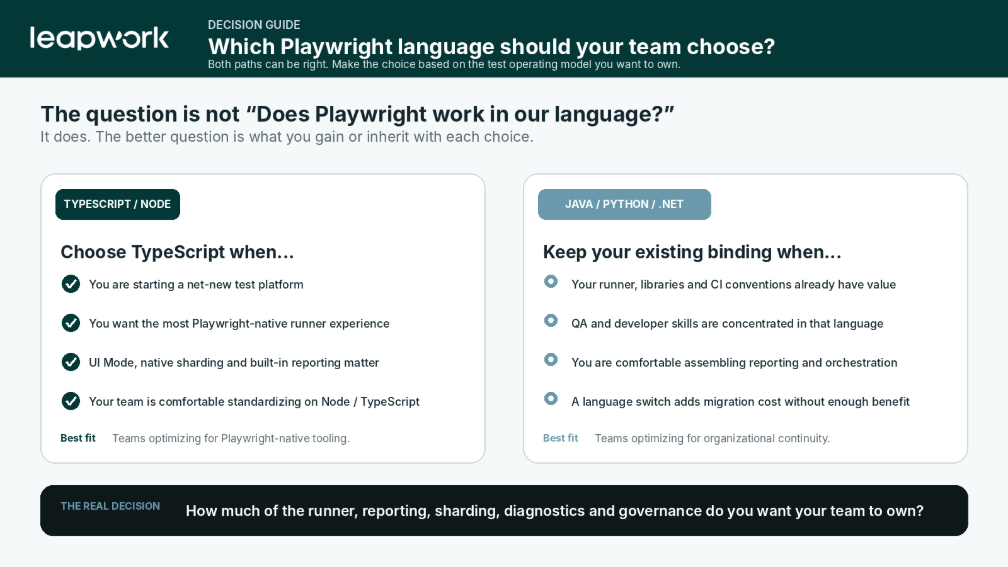
Playwright gives teams a real choice of language. TypeScript is the easier route when Playwright Test and the newest Playwright-native tooling are important to the team. If the team is building from scratch and wants the closest fit with Playwright’s newest runner-level features, TypeScript is the easier default.
If the organization already has a strong Java, Python or .NET testing stack, keeping it can avoid migration work that brings little practical benefit. These languages remain sensible choices when their existing runners and team conventions are worth keeping.
AI helps on both paths because it lowers the cost of authoring code in an unfamiliar language and makes syntax less of a barrier. But the suite still needs a place to run and a practical way to investigate failures, store evidence and control access. Some teams will build that layer themselves around raw Playwright. Others will prefer a shared platform.
Leapwork Play gives teams a shared workspace for Playwright automation, including existing scripts, with execution and management handled in the same environment. If you prefer an enterprise platform around Playwright, Leapwork Play brings existing and new Playwright automation into one workspace with execution and enterprise management around it.